|
|
| |
|
|
 |
| |
| |
|
Advanced |
|
| |
|
|
Porting
Files Across Platforms Using FTP:
Part Three |
 |
|
|
|
|
|
|
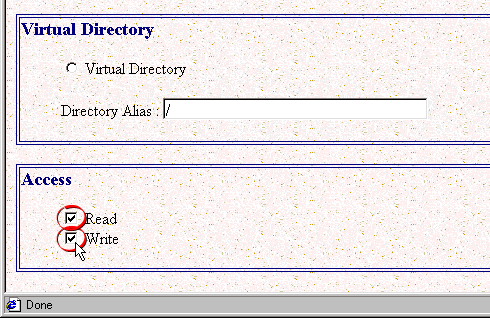
8. In the Directories page, put a check
mark in each of the "Read" and "Write"
check boxes to allow full read and write privileges.
 |
|
Warning!
If your network is connected to the Internet make
sure that you only do this on a computer that is
protected behind a correctly configured firewall.
Without a firewall anyone on the Internet can make
an FTP connection and gain access to your hard drive.
|
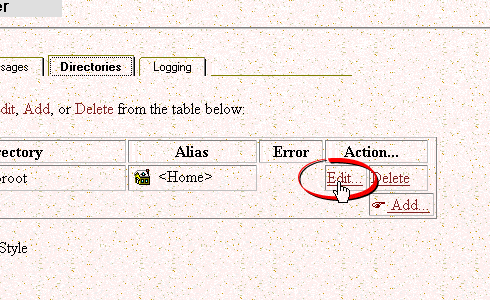
9. Next click the "Edit" link
for the FTP root folder.
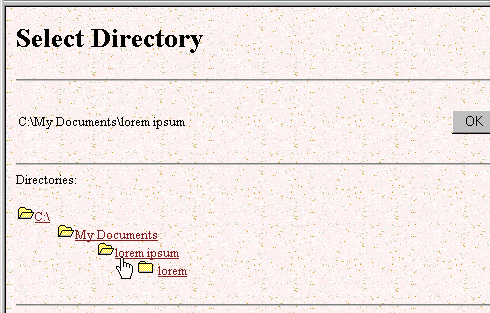
10. In the Directory Edit page, click
the "Browse" button and browse to the folder
you wish to setup as the new FTP root folder. Click
"OK" when done. Continue clicking "OK"
on each page while exiting the Internet Services Administrator.
Click
Here To Continue... |
|
|
|
|
| |
Previous
Home
Contact Mike
Related Sites
Next
Copyright
© 1998-2016 Mike Doughty, All Rights Reserved Legal
Notices
Page Last Revised: October 26, 2016
Privacy Policy
|
|
|
|
|
|
|
|
